
What's new
List your business
Open the Trader Directory from Menu and claim your handle. Fill in three things and you're live:
- What you do, in plain words a customer would use — "home baker · custom cakes & kuih for events".
- Your city and state.
- Your SSM registration number.
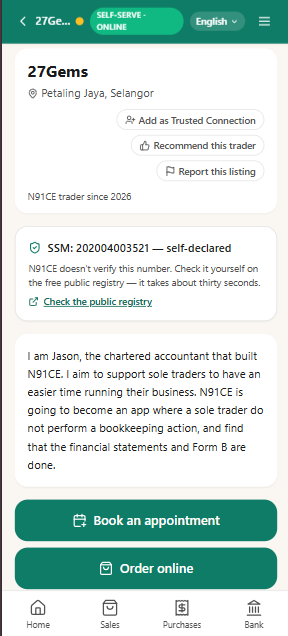
Check the live preview — this is exactly what buyers will see — then publish. Here's a real listing, live on the directory today:
Report or recommend, privately
Share warnings and recommendations together with your Trusted Connection.
Discover other traders
Open the Trader Directory from Menu, and search:
- "photographer, Petaling Jaya"
- "home baker, Shah Alam"
- "@ahmad-plumbing" — straight to a handle you already know
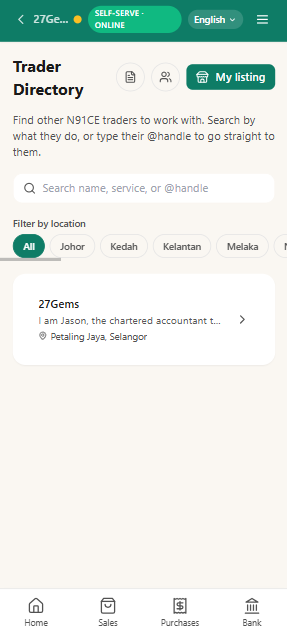
Every result is a real Jade business that's chosen to list.
Enquire and Coordinate
Message each other before confirming the booking and ordering:
- "Can you do 50 boxes by the 28th?"
- "Do you deliver to Puchong, or pickup only?"
Automated bookkeeping
Doing business with another Jade-enabled trader automates bookkeeping for both of you.
Their invoice automatically becomes your bill. Your invoice automatically becomes their bill.
The number of verified completed engagements gives you confidence that you found the right person.
How to turn it on
- 1 Open Jade → Menu → Trader Directory and claim your handle.
- 2 Fill in what you do, your SSM number, and your location.
- 3 Check the preview — this is exactly what buyers will see — then publish.
- 4 Browse the directory yourself — you might find your next supplier before anyone finds you.
Notes
Versions. Jade is now v1.3.2.
Your listing is public, on purpose. Once you publish, any Jade trader can find it — that's the point. Your books stay exactly as private as they've always been; turning this on changes nothing about your ledger or your backups.
Included. Listing, browsing, booking, messaging, reciprocal invoicing — all of it is included, like every other Jade feature.
If Jade looks out of date. Open Menu and tap "Not seeing the latest version? Tap to refresh" near the bottom. Still stuck? Hard-refresh your browser — Ctrl+Shift+R (Windows/Linux) or Cmd+Shift+R (Mac) — or on phone, close the tab or app fully and reopen it. This happens because Jade runs offline-first: your browser keeps a local copy so it still works without a signal, and that copy can lag a version behind right after we ship something new.
Already using Jade? Open Menu → Trader Directory — claiming your handle takes a minute.
New to Jade? Start Jade, then list your business once you're set up.
Read more about what Jade does.